PureBox vs Trimbox
A Trimbox alternative that does more than unsubscribe - and needs no extension
Trimbox is a browser extension built for one-click unsubscribe, with your email staying on your device. PureBox works directly in Gmail to show important mail first, then lets you approve Archive and Trash cleanups.
No-card Free scan · Review before applying
Beyond unsubscribe
Trimbox focuses on unsubscribing and mass-deleting senders. PureBox also shows mail worth reading before cleanup and explains each suggestion.
No browser extension
PureBox runs as a web app you sign into - nothing to add to your browser. Trimbox is a Chrome extension.
Review-first, with a history
You approve every suggestion before it moves. Approved actions happen in Gmail and show up in History.
When PureBox fits better than Trimbox
- You want more than unsubscribe - important mail first, then review-first cleanup.
- You would rather sign into a web app than install a browser extension.
- You want a plain-language reason behind each suggestion before you approve it.
- You want cleanup tailored to your own Gmail engagement, so a sender you regularly read is handled differently from one you never open.
When Trimbox may fit better
- You mainly want fast one-click unsubscribe and nothing more.
- You prefer that processing stays on your own device via a local extension.
- You are comfortable working inside a browser extension rather than a web app.
We'd rather you find the right tool than the wrong subscription.
At-a-glance comparison
As of June 2026. Pricing and privacy sources are linked below.
Important-first view before cleanup
PureBox
PureBox advantage: Yes - finds important emails before cleanupTrimbox
NoBulk unsubscribe
PureBox
Not offered todayTrimbox
YesArchive or Trash after review
PureBox
PureBox advantage: Yes - review first, then ApplyTrimbox
Mass-delete by senderAction history and Gmail visibility
PureBox
PureBox advantage: Yes - action history plus Gmail remains auditableTrimbox
Acts in Gmail through the extensionTime-saved metric shown to user
PureBox
PureBox advantage: Shows reclaimable time before review and reclaimed time after ApplyTrimbox
NoFree scan or trial
PureBox
PureBox advantage: No-card Free scan with inbox-specific resultsTrimbox
Free tier, with a paid upgradePaid pricing
PureBox
$5.99/month or $47.88/year (save 33% vs monthly)Trimbox
Paid upgrade - see Trimbox for current pricingMailbox fit today
PureBox
Gmail and Google Workspace. Other providers are not supported yet.Trimbox
Gmail (Chrome extension)Data resale or third-party data sharing
PureBox
PureBox advantage: No data resale or advertising useTrimbox
States email never leaves your devicePermissions requested from Gmail
PureBox
Secure Google Sign-In; restricted Gmail scopesTrimbox
Runs locally as a browser extensionCustom rules
PureBox
PureBox advantage: Optional - not required to startTrimbox
NoMobile access
PureBox
Android app (Google Play) & mobile web; no native iOS app yetTrimbox
Desktop browser extension
Privacy and data stance
PureBox
Minimum Gmail OAuth scopes. We do not sell your data and we do not use it for advertising. Disconnect at any time. Read our privacy policy.
Trimbox
Trimbox is a browser extension and states that your email never leaves your device and that it does not share your data. Because it runs locally, processing happens in your browser rather than on a server. See their privacy policy for current language. Read its privacy notice.
Pricing
PureBox
No-card Free scan offers a sample review of 100 emails across your top 10 senders in Inbox, Archive, and Trash. Pro adds full inbox coverage and optional automatic cleanup at $5.99/month or $47.88/year (save 33% vs monthly).
See full pricingTrimbox
Trimbox offers a free tier with a paid upgrade. Pricing can change - check the Trimbox site for current plans.
Trimbox pricing →As of June 2026.
What you actually do in PureBox
- 1. Connect with Google OAuth. Your Gmail password stays with Google.
- 2. Review suggestions, sender by sender, before anything moves.
- 3. Apply approved Archive, Trash, and label actions to Gmail.
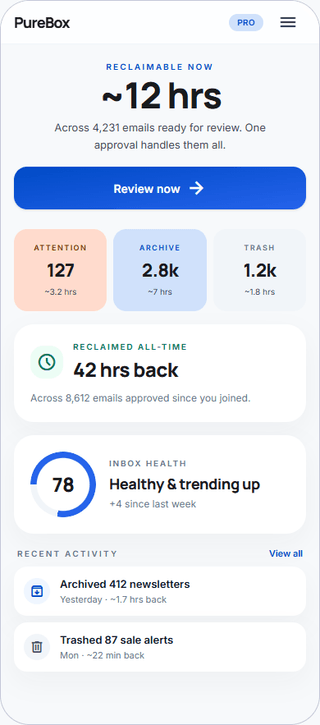
Your Gmail stays as it is until you approve a suggestion. After Apply, the action happens in Gmail and appears in PureBox History. Google handles sign-in, so your Gmail password stays with Google.
Frequently asked questions
What is Trimbox?
Trimbox is a Chrome browser extension that helps you unsubscribe from mailing lists in one click and mass-delete old messages from a sender. It runs locally and states that your email never leaves your device. It is focused squarely on unsubscribe and bulk-delete, primarily for Gmail.How does PureBox compare to Trimbox?
Trimbox is a single-job unsubscribe extension. PureBox is a web app that does more: it shows important mail before cleanup, proposes Archive and Trash cleanups in plain language with a reason for each, and keeps a history. PureBox works directly with Gmail after approval; Trimbox keeps processing on your device, which some people prefer.Does PureBox need a browser extension like Trimbox?
No. PureBox is a web app you sign into with Google OAuth - there is nothing to install in your browser. Trimbox is a Chrome extension. If you specifically want a local, on-device tool, Trimbox fits that model; if you would rather not add an extension, PureBox does not require one.Can PureBox unsubscribe from mailing lists like Trimbox?
Bulk unsubscribe is not offered in PureBox today - that is Trimbox's core strength. PureBox focuses on showing important mail and proposing review-first Archive and Trash cleanups that you approve before they apply to Gmail. If one-click unsubscribe is your only goal, Trimbox may be the better fit; if you want broader triage, PureBox covers more of the job.Is PureBox private like Trimbox?
Both take privacy seriously in different ways. Trimbox keeps processing on your device as a local extension. PureBox connects through minimum Gmail OAuth scopes, does not sell your data, and does not use it for advertising. Choose the model you trust more.
See whether review-first cleanup fits your Gmail
No-card Free scan · Review before applying