PureBox vs Mailstrom
A calmer alternative to Mailstrom - suggestions, not a control panel
Mailstrom gives you a powerful manual toolkit to slice through mail yourself. PureBox does the first pass in Gmail: important mail first, cleanup suggestions next, and Apply only after you approve.
No-card Free scan · Review before applying
It reads the inbox first
Mailstrom amplifies manual sorting. PureBox proposes Archive and Trash suggestions with a plain-language reason, so the first pass is ready to review.
Important-first, not just bulk
PureBox shows the mail worth reading before you approve cleanup for the bulk around it.
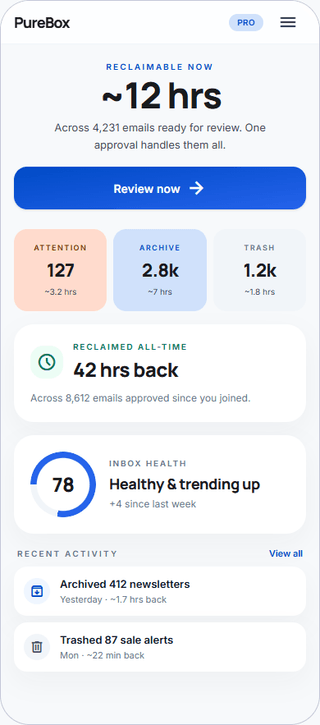
Time saved, not emails counted
Progress shows up as minutes and hours back, not a running tally of how many messages you sliced.
When PureBox fits better than Mailstrom
- You want the tool to do the first pass and suggest cleanups, not hand you a power panel.
- You want important mail surfaced before you approve cleanup.
- You are on Gmail and want a calm, review-first workflow.
- You want suggestions that reflect how your own inbox behaves - the senders you read versus the ones you skip - rather than an average inbox.
When Mailstrom may fit better
- You prefer a fully manual power tool and explicitly do not want AI suggestions.
- You need multi-provider support now (Outlook, Yahoo, AOL, IMAP).
- You manage very large multi-account inboxes and want filter-driven bulk control.
We'd rather you find the right tool than the wrong subscription.
At-a-glance comparison
As of June 2026. Pricing and privacy sources are linked below.
Important-first view before cleanup
PureBox
PureBox advantage: Yes - finds important emails before cleanupMailstrom
Manual bundles and smart filtersBulk unsubscribe
PureBox
Not offered todayMailstrom
YesArchive or Trash after review
PureBox
PureBox advantage: Yes - review first, then ApplyMailstrom
YesAction history and Gmail visibility
PureBox
PureBox advantage: Yes - action history plus Gmail remains auditableMailstrom
Acts directly on the mailboxTime-saved metric shown to user
PureBox
PureBox advantage: Shows reclaimable time before review and reclaimed time after ApplyMailstrom
NoFree scan or trial
PureBox
PureBox advantage: No-card Free scan with inbox-specific resultsMailstrom
No-card free trialPaid pricing
PureBox
$5.99/month or $47.88/year (save 33% vs monthly)Mailstrom
From $59.95/year (1 account) to $199.95/year (20 accounts)Mailbox fit today
PureBox
Gmail and Google Workspace. Other providers are not supported yet.Mailstrom
Gmail, Outlook, Yahoo, AOL, IMAPData resale or third-party data sharing
PureBox
PureBox advantage: No data resale or advertising useMailstrom
States it does not use or share your dataPermissions requested from Gmail
PureBox
Secure Google Sign-In; restricted Gmail scopesMailstrom
OAuth2 mailbox access (no password)Custom rules
PureBox
PureBox advantage: Optional - not required to startMailstrom
Smart filters (200 to 1,000 by plan)Mobile access
PureBox
Android app (Google Play) & mobile web; no native iOS app yetMailstrom
Web app
Privacy and data stance
PureBox
Minimum Gmail OAuth scopes. We do not sell your data and we do not use it for advertising. Disconnect at any time. Read our privacy policy.
Mailstrom
Mailstrom states it does not use or share your data and connects through OAuth2, so it never holds your password. Processing happens on Mailstrom-managed infrastructure. See their privacy policy for current language. Read its privacy notice.
Pricing
PureBox
No-card Free scan offers a sample review of 100 emails across your top 10 senders in Inbox, Archive, and Trash. Pro adds full inbox coverage and optional automatic cleanup at $5.99/month or $47.88/year (save 33% vs monthly).
See full pricingMailstrom
No-card free trial, then annual plans: about $59.95/year for one account (up to 10,000 emails), $99.95/year for three accounts, and $199.95/year for twenty accounts.
Mailstrom pricing →As of June 2026.
What you actually do in PureBox
- 1. Connect with Google OAuth. Your Gmail password stays with Google.
- 2. Review suggestions, sender by sender, before anything moves.
- 3. Apply approved Archive, Trash, and label actions to Gmail.
Your Gmail stays as it is until you approve a suggestion. After Apply, the action happens in Gmail and appears in PureBox History. Google handles sign-in, so your Gmail password stays with Google.
Frequently asked questions
What is Mailstrom?
Mailstrom is an inbox cleanup tool from 410 Labs that bundles related messages so you can act on them in groups - unsubscribe, delete, archive, or block thousands at once. It is deliberately a manual power tool: it amplifies your own sorting rather than guessing what is important. It works across Gmail, Outlook, Yahoo, AOL, and IMAP.How does PureBox compare to Mailstrom?
Mailstrom hands you a fast manual toolkit and stays out of your judgment. PureBox does the first pass for you: it finds important mail, proposes Archive and Trash suggestions in plain language with a reason for each, and waits for you to approve before applying changes to Gmail. Mailstrom is control-first; PureBox is review-first.Is PureBox cheaper than Mailstrom?
PureBox Pro is $5.99/month or $47.88/year after a no-card Free sample review. Mailstrom starts around $59.95 per year for one account and rises with account count and mailbox size. For a single Gmail account, the two are close on price; PureBox keeps one simple plan.Does Mailstrom use AI like PureBox?
No. Mailstrom positions itself against AI guessing - it is a manual power tool by design. PureBox uses classification to propose suggestions and writes a plain-language reason for each one, but nothing moves until you approve. If you specifically do not want AI making suggestions, Mailstrom may suit you better.Can I switch from Mailstrom to PureBox?
Yes. Connect Gmail, run the no-card Free scan, and review PureBox suggestions before applying them. There is nothing to migrate, because approved actions apply to messages already in Gmail. If you cancel Mailstrom, your mail stays in Gmail and remains reversible there.
See whether review-first cleanup fits your Gmail
No-card Free scan · Review before applying