PureBox vs Clean Email
A Clean Email alternative that explains each Gmail cleanup
PureBox shows important mail first, gives every suggestion a reason, and waits for you to approve Gmail changes.
No-card Free scan · Review before applying
A reason for every suggestion
Review why PureBox suggests Inbox, Archive, or Trash before you apply a Gmail change.
Important-first, not just cleanup
PureBox shows the mail worth seeing before asking you to approve Archive or Trash suggestions.
Approval is the default
Nothing changes in Gmail until you select Apply Cleanup.
When PureBox fits better than Clean Email
- You want a calm workflow that applies approved actions directly to Gmail.
- You don’t want to learn a dashboard of dozens of controls.
- You want a reason for each suggestion before you approve it.
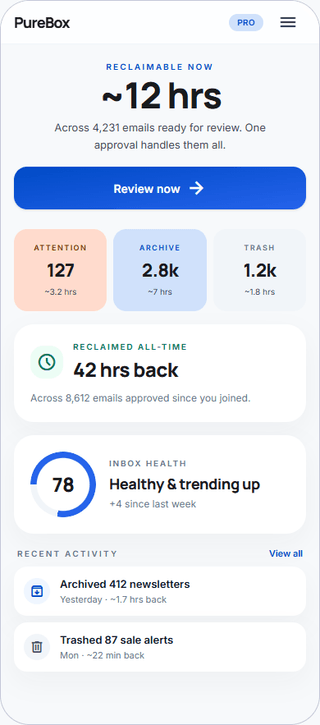
- You think in time saved, not features used.
When Clean Email may fit better
- You want bulk unsubscribe and deep custom rules from day one.
- You need multi-provider support (Outlook, IMAP, iCloud) right now.
- You want native iOS/Android apps, not just responsive web.
We'd rather you find the right tool than the wrong subscription.
At-a-glance comparison
As of August 2026. Pricing and privacy sources are linked below.
Important-first view before cleanup
PureBox
PureBox advantage: Yes - finds important emails before cleanupClean Email
Cleaning Suggestions, Smart Folders, and ScreenerBulk unsubscribe
PureBox
Not offered todayClean Email
YesArchive or Trash after review
PureBox
PureBox advantage: Yes - review first, then ApplyClean Email
YesAction history and Gmail visibility
PureBox
PureBox advantage: Yes - action history plus Gmail remains auditableClean Email
Unsubscribe and Auto Clean historyTime-saved metric shown to user
PureBox
PureBox advantage: Shows reclaimable time before review and reclaimed time after ApplyClean Email
NoFree scan or trial
PureBox
PureBox advantage: No-card Free scan with inbox-specific resultsClean Email
First 1,000 emails, 25 unsubscribes, and a 14-day premium trialPaid pricing
PureBox
$5.99/month or $47.88/year (save 33% vs monthly)Clean Email
$9.99/month or $29.99/year for 1 accountMailbox fit today
PureBox
Gmail and Google Workspace. Other providers are not supported yet.Clean Email
Gmail, Outlook, Yahoo, IMAP, iCloudData resale or third-party data sharing
PureBox
PureBox advantage: No data resale or advertising useClean Email
States subscription-funded with no data sale or advertisingPermissions requested from Gmail
PureBox
Secure Google Sign-In; restricted Gmail scopesClean Email
OAuth mailbox access; states bodies and attachments are not downloadedCustom rules
PureBox
PureBox advantage: Optional - not required to startClean Email
Deep rule scriptingMobile access
PureBox
Android app (Google Play) & mobile web; no native iOS app yetClean Email
Native iOS and Android apps
Privacy and data stance
PureBox
Google OAuth. We do not sell personal information or share it for behavioral advertising. Revoke access at any time. Read our privacy policy.
Clean Email
Clean Email states that subscription revenue funds the service, it does not sell user data, and it does not download full message bodies or attachments. Read its privacy notice.
Pricing
PureBox
No-card Free scan offers a sample review of 100 emails across your top 10 senders in Inbox, Archive, and Trash. Pro adds full inbox coverage and optional automatic cleanup at $5.99/month or $47.88/year (save 33% vs monthly).
See full pricingClean Email
The free offer covers the first 1,000 emails, 25 newsletter unsubscribes, and a 14-day premium trial. One account costs $9.99 monthly or $29.99 yearly.
Clean Email pricing →As of August 2026.
What you actually do in PureBox
- 1. Connect with Google OAuth. Your Gmail password stays with Google.
- 2. Review suggestions, sender by sender, before anything moves.
- 3. Apply approved Archive, Trash, and label actions to Gmail.
Your Gmail stays as it is until you approve a suggestion. After Apply, the action happens in Gmail and appears in PureBox History. Google handles sign-in, so your Gmail password stays with Google.
Frequently asked questions
What is Clean Email?
Clean Email is an inbox-management service with Cleaning Suggestions, Smart Folders, unsubscribe tools, Screener, and Auto Clean rules across multiple email providers. It suits people who want broad bulk controls, automation, and mobile apps.How does PureBox compare to Clean Email?
PureBox focuses on a calmer, review-first Gmail workflow: it shows important mail before cleanup, explains Inbox, Archive, and Trash suggestions, then applies only what you approve. Clean Email offers broader provider support and deeper rule customization. PureBox emphasizes quick decisions and visible review; Clean Email emphasizes configurable controls across many inbox types.Is PureBox cheaper than Clean Email?
PureBox Pro is $5.99/month or $47.88/year after the no-card Free sample review. Clean Email offers the first 1,000 emails free, then charges $9.99 monthly or $29.99 yearly for one account. PureBox costs more annually but includes full-inbox coverage and ongoing relief.Can I switch from Clean Email to PureBox?
Yes. Connect Gmail, run the no-card Free scan, and review PureBox recommendations before applying them. You do not need to migrate mailbox data, because approved PureBox actions apply to messages already in Gmail. If you cancel Clean Email, your messages remain in Gmail and existing organization labels still stay accessible.Does PureBox work with the same email accounts as Clean Email?
Not today. PureBox is currently Gmail-focused, including Google Workspace accounts. Clean Email supports a larger provider mix, including Outlook, Yahoo, IMAP, and iCloud. If your team is mostly Gmail, PureBox offers a focused review-first experience. If you require mixed-provider support now, Clean Email may fit better.
See whether review-first cleanup fits your Gmail
No-card Free scan · Review before applying