PureBox vs Unroll.Me
An Unroll.Me alternative funded by subscriptions, not market research
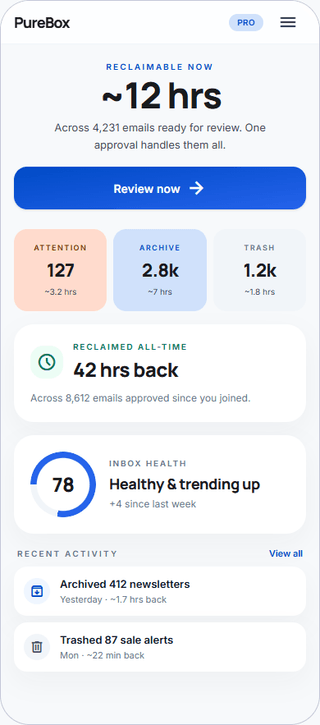
PureBox shows important Gmail first, explains Archive and Trash suggestions, and waits for approval before anything changes.
No-card Free scan · Review before applying
A direct subscription model
PureBox charges for Pro instead of using commercial-email data for a consumer research panel.
Review-first cleanup
See Archive and Trash suggestions before anything moves, with plain-language reasons and History.
Cleanup that’s reversible
Approved actions happen in Gmail and show up in History, so you can audit what changed.
When PureBox fits better than Unroll.Me
- You prefer a subscription-funded service over a consumer-panel business model.
- You want cleanup beyond unsubscribe: important mail first, then Archive and Trash review.
- You want review-first Gmail cleanup instead of a rollup-only workflow.
When Unroll.Me may fit better
- You only want a free, one-tap rollup digest of newsletters.
- You specifically need bulk unsubscribe today.
- You accept the consumer-panel data use described in Unroll.Me’s privacy notice.
We'd rather you find the right tool than the wrong subscription.
At-a-glance comparison
As of August 2026. Pricing and privacy sources are linked below.
Important-first view before cleanup
PureBox
PureBox advantage: Yes - finds important emails before cleanupUnroll.Me
NoBulk unsubscribe
PureBox
Not offered todayUnroll.Me
YesArchive or Trash after review
PureBox
PureBox advantage: Yes - review first, then ApplyUnroll.Me
NoAction history and Gmail visibility
PureBox
PureBox advantage: Yes - action history plus Gmail remains auditableUnroll.Me
Re-subscribe manuallyTime-saved metric shown to user
PureBox
PureBox advantage: Shows reclaimable time before review and reclaimed time after ApplyUnroll.Me
NoFree scan or trial
PureBox
PureBox advantage: No-card Free scan with inbox-specific resultsUnroll.Me
Free subscription-management servicePaid pricing
PureBox
$5.99/month or $47.88/year (save 33% vs monthly)Unroll.Me
No consumer subscription price shownMailbox fit today
PureBox
Gmail and Google Workspace. Other providers are not supported yet.Unroll.Me
Gmail, Outlook, YahooData resale or third-party data sharing
PureBox
PureBox advantage: No data resale or advertising useUnroll.Me
May sell or share commercial-email and demographic informationPermissions requested from Gmail
PureBox
Secure Google Sign-In; restricted Gmail scopesUnroll.Me
Collects copies of and information from commercial emailsCustom rules
PureBox
PureBox advantage: Optional - not required to startUnroll.Me
NoMobile access
PureBox
Android app (Google Play) & mobile web; no native iOS app yetUnroll.Me
iOS and Android apps
Privacy and data stance
PureBox
Google OAuth. We do not sell personal information or share it for behavioral advertising. Revoke access at any time. Read our privacy policy.
Unroll.Me
Unroll.Me’s current notice identifies it as a NielsenIQ company. It says commercial-email and demographic information may be sold or shared for market intelligence, while directly identifying information is not provided to those customers for individual targeting. Read its privacy notice.
Pricing
PureBox
No-card Free scan offers a sample review of 100 emails across your top 10 senders in Inbox, Archive, and Trash. Pro adds full inbox coverage and optional automatic cleanup at $5.99/month or $47.88/year (save 33% vs monthly).
See full pricingUnroll.Me
Unroll.Me presents its subscription-management service as free. Its privacy notice describes participation in NielsenIQ’s consumer panel and market-intelligence products.
Unroll.Me pricing →As of August 2026.
What you actually do in PureBox
- 1. Connect with Google OAuth. Your Gmail password stays with Google.
- 2. Review suggestions, sender by sender, before anything moves.
- 3. Apply approved Archive, Trash, and label actions to Gmail.
Your Gmail stays as it is until you approve a suggestion. After Apply, the action happens in Gmail and appears in PureBox History. Google handles sign-in, so your Gmail password stays with Google.
Frequently asked questions
What is Unroll.Me?
Unroll.Me is a subscription-management tool known for blocking messages and combining commercial email into a Rollup digest. It is operated by Unrollme LLC, a NielsenIQ company. Its current privacy notice describes the service as part of a consumer panel used for market intelligence.How does PureBox compare to Unroll.Me?
PureBox does not include bulk unsubscribe today. It focuses on showing important Gmail first, then presenting explained Archive and Trash suggestions with a review step before actions run. Unroll.Me focuses on subscription management, blocking, and Rollup. The products also use different business models: PureBox sells Pro subscriptions, while Unroll.Me describes a NielsenIQ consumer panel.Is PureBox cheaper than Unroll.Me?
Unroll.Me presents its service as free, while PureBox uses a paid subscription after the no-card Free scan. PureBox Pro is $5.99/month or $47.88/year. The trade-off is business model and scope: PureBox charges for broader review-first cleanup, while Unroll.Me’s privacy notice describes a consumer-panel model.Can I switch from Unroll.Me to PureBox?
Yes. You can connect Gmail to PureBox, run the no-card Free scan, and start approving cleanup actions immediately. If you no longer want Unroll.Me, revoke its access from your Google account permissions page. Existing inbox messages stay in Gmail, so there is no mailbox migration step required.Does PureBox work with the same email accounts as Unroll.Me?
Not fully. PureBox is currently focused on Gmail and Google Workspace accounts. Unroll.Me supports a broader provider set, including Yahoo and Outlook. If your inbox workflow is Gmail-first, PureBox offers deeper cleanup control. If you need mixed-provider support today, Unroll.Me may cover more account types.
See whether review-first cleanup fits your Gmail
No-card Free scan · Review before applying